| Page021 |
| C/C++ Programming - GUI Creator |
|
When I first began programming in C, I rewrote a basic program I used to print checks for paying my bills. The first version was strictly dialogue oriented. Then I thought it would be neat to represent the layout of the check graphically on screen. Used graphic functions in uSoft C to create a GUI with panels, labeled buttons, text display windows and a dialogue box. Each button had a subroutine (function) associated with it. Each button function's entry and exit code was identical. Each button had it's own call to whatever function was written to perform the button's job. The same was true for all graphic items. |
|
Realizing the repetitive nature of it all, I rewrote the program setting up numbered button arrays, text display window arrays and so on for all graphic items as well as text string arrays for corresponding buttons.This all worked out very well. After this exercise, I realized that any kind of GUI layout could be defined using this program as a template (thought of calling it a C-Shell). Hence, renamed a copy of the program GUI.C and replaced specific nomenclature with generic. Made sure the program supported: Panels, Buttons, Display Windows, Dialog Boxes, Graphic Work Areas and drawing simple boxes for sectioning areas on the GUI. Mapping image files into the GUI was fun. Had to graduate from 16 color video mode to 256 (max at the time) to display decent pictures. Therefore, two versions of the GUI.C program came into existence GUI16.C and GUI256.C. |
|
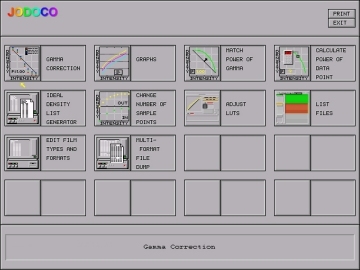
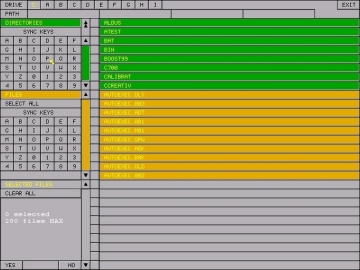
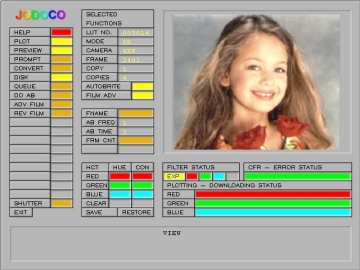
Using the GUI programs as templates facilitated the writing of many programs used to operate tests stands and prove out hardware interfaces to company products such as film recorders and camera interfaces. Programs are all DOS-Stand Alone as well as run-able via Windows OS. The first GUI on this page is a capable of calling and running programs. The second is a File-Selector for subsequent program use. The last demonstrates mapping a video image file into a local work area for confirmation before sending to film. |
[TOC] [PREVIOUS] [NEXT] |
